Configuring browsers for SSO authentication
In order to enable SSO authentication for your 4gl applications, you have to properly configure your browser.
Below you can find the necessary information on configuring different browsers.
You can refer here and here for certain details.
Mozilla Firefox
Mozilla Firefox supports the SPNEGO authentication protocol but must be configured to work correctly for Kerberos authentication.
By default, Firefox rejects all SPNEGO challenges from any web server. You have to configure the white list of sites permitted to exchange SPNEGO protocol messages with the browser.
Step 1. Open Mozilla Firefox.
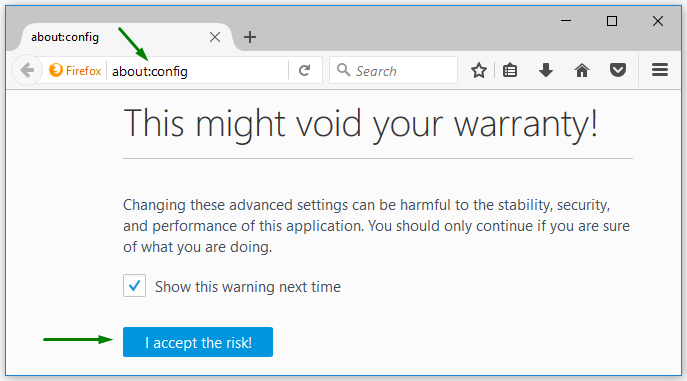
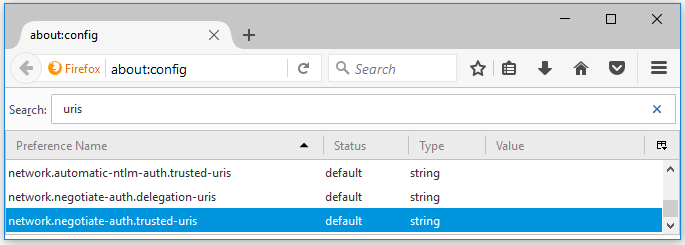
 Step 3. Find the following preferences in the list.
network.negotiate-auth.trusted-uris
network.automatic-ntlm-auth.trusted-uris
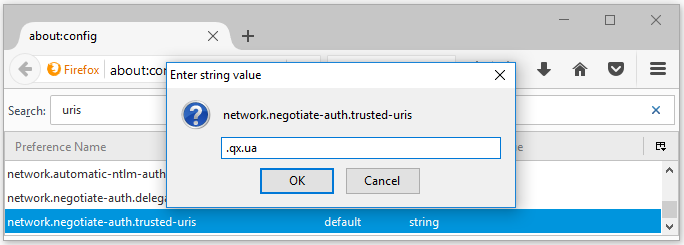
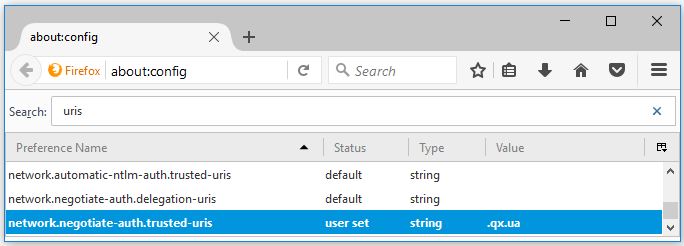
Step 4. Specify the necessary host or domain names.
You can use wild-carded domains as well:
More information about enabling SSO authentication in Firefox is here.
Google Chrome
With  , you generally
need to set command-line parameters in order to white list servers with
Chrome will negotiate.
, you generally
need to set command-line parameters in order to white list servers with
Chrome will negotiate.
On  , Google Chrome
shares the configuration with Internet Explorer, after the proper configuration
of IE you do not need to additionally configure Chrome.
, Google Chrome
shares the configuration with Internet Explorer, after the proper configuration
of IE you do not need to additionally configure Chrome.
On  and
and  , you have to specify the command-line
parameter --auth-negotiate-delegate-whitelist
only if Kerberos is involved (otherwise, there is no need to set
this parameter):
, you have to specify the command-line
parameter --auth-negotiate-delegate-whitelist
only if Kerberos is involved (otherwise, there is no need to set
this parameter):
--auth-server-whitelist="*.qx.ua"
--auth-negotiate-delegate-whitelist="*.qx.ua"
Internet Explorer
Internet Explorer supports the SSO authentication with the Kerberos protocol but need additional configuration of the network or domain environment. Besides, this browser uses security zones for distinguishing which hosts belong to Internet, local intranet, trusted sites, or restricted sites.
To enable SSO authentication for your 4gl applications with Internet Explorer, please follow these steps:
Step 1. Open Internet Explorer.

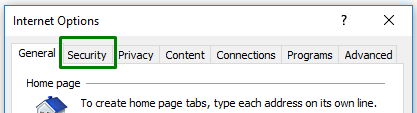
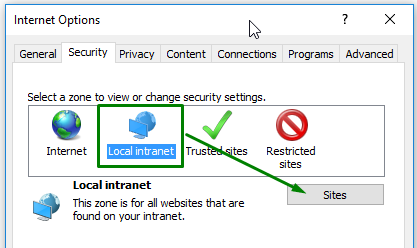
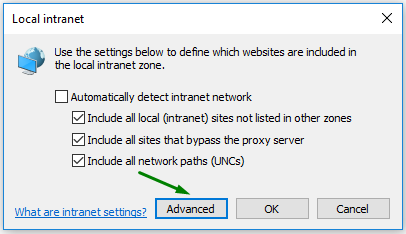
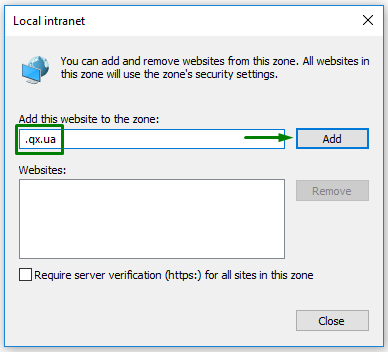
Step 5. Now you have enable the SSO authentication for the qx.ua domain in Internet Explorer.
More information about enabling SSO authentication in Internet Explorer is here.
Safari
On , Safari supports
the SPNEGO protocol (both Kerberos and NTLM) by default, so there is no
need for any further configurations.
On , Safari supports
the SPNEGO protocol with Kerberos as an authentication mechanism for computers
where Mac OS is joined to Active Directory (refer here
for details). If Mac OS is not joined to AD, then SPNEGO will always use
NTLM as the authentication mechanism.