INPUT ARRAY control clauses
INPUT ARRAY control clauses specify the behavior of the cursor and keys during the input. Each INPUT ARRAY control clause must contain at least one executable statement and the keywords that specify when this statement or statements will be executed.
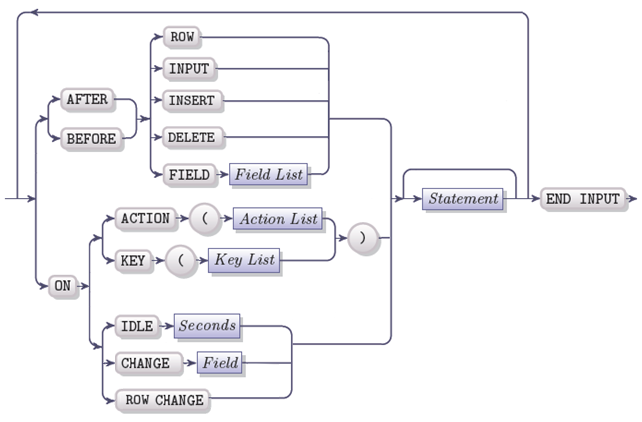
|
Field list |
A list of one or more form fields separated by commas |
|
FieldField |
A single form field |
|
Action list |
A list that consists of one to four actions separated by commas and enclosed in quotation marks |
|
Key list |
A list that consists of one to four key names separated by commas |
|
Seconds |
An integer value specifying the number of seconds |
|
Statement |
The statement block of the INPUT ARRAY control clause |
An INPUT ARRAY control clause can specify:
- Actions to be performed before and after the input (BEFORE INPUT and AFTER INPUT clauses)
- Actions conditioned by the cursor movement (BEFORE FIELD and AFTER FIELD, BEFORE ROW and AFTER ROW clauses)
- Actions to be performed before and after the insert of a row (BEFORE INSERT and AFTER INSERT clauses)
- Actions to be performed before and after the delete of a row (BEFORE DELETE and AFTER DELETE clauses)
- Actions to be performed when user presses a key or a button (ON KEY and ON ACTION clauses)
If the INPUT statement contains at least one INPUT ARRAY control clause, the END INPUT keywords must be included into the INPUT ARRAY statement. If there are no INPUT ARRAY control clauses, 4GL waits until the data are entered to the fields specified in the INPUT ARRAY statement. It is terminated, if the Accept key is pressed.
Statement block
Statement block following each INPUT control clause must include at least one executable statement. It can include these:
- 4GL or SQL statements
- The NEXT FIELD keywords that specify the next field where the cursor will be moved
- The CONTINUE INPUT keywords that returns control to the user without INPUT termination
- The EXIT INPUT keywords that terminate the INPUT statement
While the statements in a control clause are executed, the form becomes inactive. It is reactivated after all the statements within the clause have been executed.
Order of INPUT ARRAY control clauses
INPUT control clauses can be listed in any order. However, 4GL executes them in this fixed order:
-
BEFORE FIELD screen-array
-
BEFORE FIELD screen-array.field
-
AFTER FIELD screen-array
-
AFTER FIELD screen-array.field
You can have any number of the ON KEY and ON ACTION clauses, the maximal number of the BEFORE FIELD and AFTER FIELD clauses is limited by the number of fields in specified by the INPUT ARRAY statement. You can have only one BEFORE INSERT, AFTER INSERT, BEFORE DELETE, AFTER DELETE, BEFORE INPUT, AFTER INPUT, BEFORE ROW, and AFTER ROW clause.
Within the control clauses you can use the NEXT FIELD, EXIT INPUT and CONTINUE INPUT keywords.
BEFORE FIELD and AFTER FIELD clauses as well as the NEXT FIELD keywords refer to the order of fields implied by the screen record in the FROM clause. You can specify the field with the help of a table reference or by prefixing it with the name of a record or an array : array[line].
The BEFORE FIELD screen-array and AFTER FIELD screen-array clauses influence the whole screen array, they are executed when the cursor enters or leaves any field that belongs to the screen array. The BEFORE FIELD screen-array.field and AFTER FIELD screen-array.field clauses reference a separate field within the screen array, they are executed when the cursor enters or leaves the specified field.