Installing and Activating Licenses in Virtual Environments via KMS Server
When you try to add a local license in a virtual environment, you receive an error message about the need to configure a KMS server:
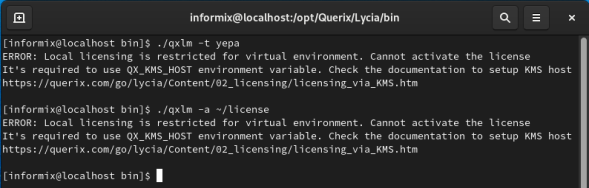
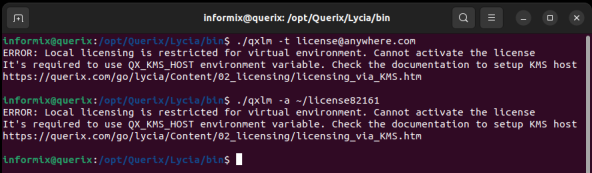
In order to install and activate Lycia licensing in any virtual environment, follow the steps below:
Step 1. Prepare the physical host for the deployment of the KMS server. KMS Server is server software that provides licensing management in virtual environments.
Step 2. The KMS server starts automatically after the installation. The KMS server can be installed using QPM command line tool or using QPM GUI (available only for  Windows).
- To install KMS server preset (KMS Server and Runtime components) using command line tool, download QPM CLI and execute the following command:
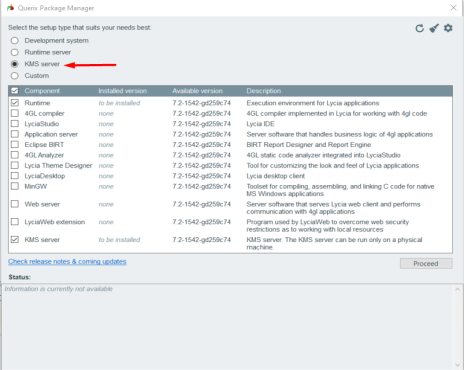
- To install KMS server preset using graphical interface, download QPM GUI and select KMS preset in order to install KMS Server component along with Runtime component:
3. Activate the license on the host machine (full information on how to activate the commercial license and the trial license).
4. For the virtual environment where Lycia is installed, specify the KMS host for the license management. There are two ways to do this:
-
In a virtual environment where Lycia is installed, add QX_KMS_HOST variable to the system environment and restart the Web server.
-
In a virtual environment where Lycia is installed, add QX_KMS_HOST=<IP address> variable with the respective value to the project's properties and to the inet.env for the runtime. Where <IP address> is the IP address of the host machine where Runtime with the KMS server is installed.
5. Now, if any of the license’s consumers such as qfgl or qrun is run inside a virtual environment, the license management is performed via the KMS server without using a local license.
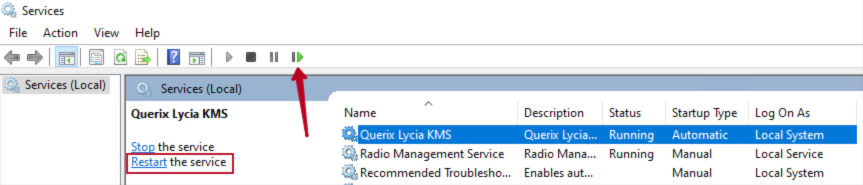
6. KMS server runs as a service on Windows and on  Linux. Therefore it can be managed from the "Services" menu on Windows or from the command line on Linux.
Managing the KMS server
You can start, stop, restart the KMS server, or check its status.
- To do this on
Linux, execute the following commands:
Start
Stop
Restart
Status
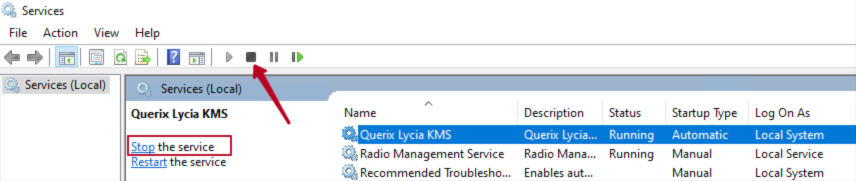
- On Windows, the KMS server runs automatically as a Windows service after installation. Therefore it can be managed from the "Services" menu:


Environment variables used for KMS server configuration
 QX_KMS_HOST specifies the KMS host for license management in virtual environments.
Syntax:
QX_KMS_HOST=host:port
QX_KMS_HOST=host
QX_KMS_HOST=:port
Possible values and their meaning:
<IP address>:<port>
QX_KMS_SERVER_LOG specifies KMS logs for the server-side.
Syntax:
Possible values and their meaning:
<path to file>
QX_KMS_CLIENT_LOG specifies KMS logs for the client-side.
Syntax:
Possible values and their meaning:
<path to file>
QX_KMS_KEY restricts access of Lycia client to the KMS server.
Syntax:
QX_KMS_KEY=any_content_up_to_32_characters
Possible values and their meaning:
{any character} an empty value is treated as if the variable had not been set
QX_KMS_CONNECTION_TIMEOUT specifies the timeout in seconds for the connection attempt for each entry in QX_KMS_HOST.
Syntax:
QX_KMS_CONNECTION_TIMEOUT=3 (default)
Possible values and their meaning:
{any integer} except for {0, negative integer}
QX_KMS_OPERATION_TIMEOUT Specifies the timeout in seconds for each interaction with the KMS server after the connection is established.
Syntax:
QX_KMS_OPERATION_TIMEOUT=7 (default)
Possible values and their meaning:
{any integer} except for {0, negative integer}