Master and Application Themes (.qxtheme)
Master theme is a theme file that has the name of the program and is stored together with it. Master themes are loaded automatically when the application (= built program) is run and are used to secure its unique appearance as compared to other applications developed for the same company.
Application theme is a user-defined theme file that is loaded from the 4GL code and allows changing runtime appearance and behavior of the application depending on the current tasks and purposes.
Differences between master and application themes are summed up in the table below.
|
|
Master theme |
Application theme |
|
has the same name as the 4GL program |
|
|
|
must be stored in the same folder as the program executable file |
|
|
|
is loaded automatically when the application is run |
|
|
|
is loaded from the 4GL code |
|
|
|
can be created by concatenating theme snippets |
|
|
|
is applied at design time |
|
|
|
is applied at runtime |
|
|
|
can be stored in any folder |
|
|


In their essence, Master and User themes are the same XML-based .qxtheme files and have the same syntax and structure.
What differs is their purpose, location, and loading time.
Below you can see an example of a .qxtheme file that can serve both a master theme and as a user theme:
|
|
<?xml version="1.0" encoding="utf-8"?> <StyleSheet xmlns="http://querix.com"> <ElementFilter ElementName="Application"> <StyleSheet> <DoStyleAction> <SetProperty> <PropertyPath> <PropertyName>Font</PropertyName> <PropertyName>Family</PropertyName> </PropertyPath> <PropertyValue> <Name>Cambria</Name> </PropertyValue> </SetProperty> </DoStyleAction> <DoStyleAction> <SetProperty> <PropertyPath> <PropertyName>Timeout</PropertyName> </PropertyPath> <PropertyValue>10</PropertyValue> </SetProperty> </DoStyleAction> </StyleSheet> </ElementFilter> </StyleSheet> |
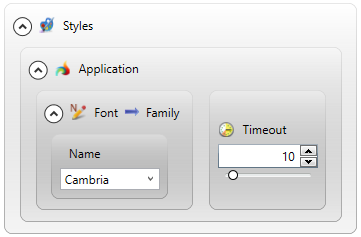
Both Master and User themes can be edited in Lycia Theme Designer (recommended) and in the built-it text editor (if you have a considerable experience of creating and editing XML code).
If you want to edit your themes as the XML code, we recommend you first to study the topics given below:
Master Theme
Master theme files can be created together with 4GL program using FGL Project Explorer. You can also create a Master theme in your favorite text editor and then add it as a file to your program — however, we recommend to use FGL Project Explorer's context menu for the file creation.
By default, your Master theme is empty. LVSCE has built-in code editors, which you can use to edit your theme file.
Master theme files are edited in the same way as any other .qxtheme files (you can find some simple examples in the Lycia Theme Designer page):
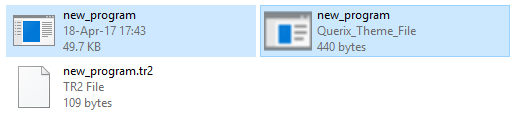
Master theme files must be located in the same folder as the program executable file (this folder is specified in listener.xml):
The appearance properties set in the Master theme for forms and form elements are applied both at design and at runtime.
 Related articles
Application Theme
Application themes are more flexible than Master themes in terms of their creation, storage, and usage:
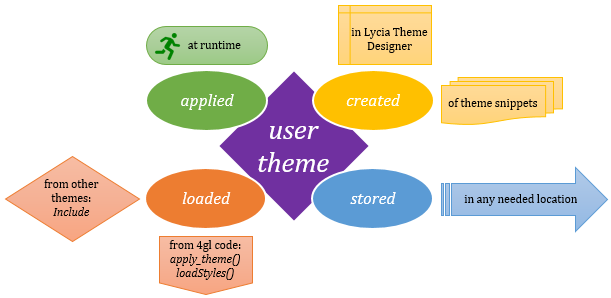
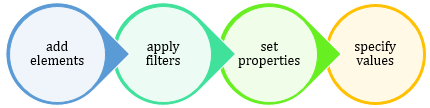
Application themes can be created in two ways:
-
populate an empty .qxtheme file in Lycia Theme Designer:
-
concatenate theme snippets stored on the client side into a application theme:
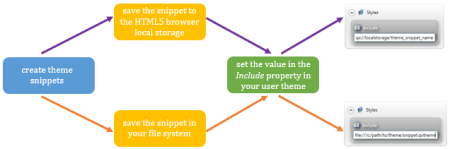
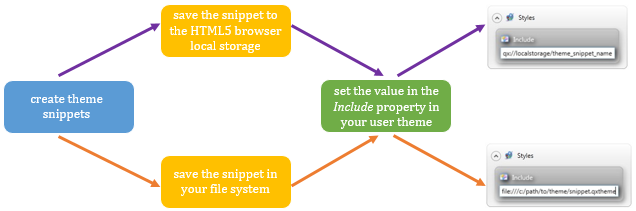
Attention: All the file names you use in your 4GL development must be platform-independent.
If you use platform-dependent names (e.g., combine upper and lower case, use colons, finish names with a full stop, etc.), please remember that they might cause different problems when you move your project to another platform.
Application themes (and their snippets) can be stored in any necessary location:
- on the server side - in any folder including the folder with the program executable file,
- on the client side - in any folder of the customer's file system and in the HTML5 browser local storage.
On the contrary to Master themes, Application themes must be loaded from your 4GL program - from the 4GL code or another theme:
-
with the apply_theme() function:
CALL apply_theme("my_user_theme")
-
with the ui.Interface.loadStyles() method:
CALLui.Interface.loadStyles("my_user_theme")
-
by setting the Include property of the master theme or other application theme:
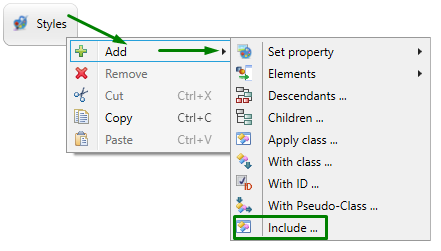
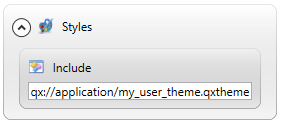
The appearance properties set in application themes for forms and form elements are applied only at runtime.