MenuSeparator
Separator is a thin horizontal or vertical line used to visually separate menu groups and menu commands.

Toolbar with 2 toolbar buttons and a separator inserted in a Grid panel as seen in Lycia Form Builder:
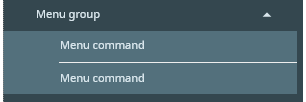
Form XML code:
Theme element filter XML code:
<ElementFilter ElementName="MenuSeparator">
...
</ElementFilter>
Most commonly used form properties:
Associated functions:
for toolbar separators:
Influence and behavior:
To add a MenuSeparator, open the Menu by clicking the "hamburger menu" button, then drag-and-drop the MenuSeparator widget from the Palette to the DesignArea, placing it between the MenuGroups or MenuCommands.
The properties of MenuSeparator are:
- ClassNames
- Collapsed
- Comment
- Identifier
- Metadata
- Visible
- Events
You can change these properties via Lycia Theme Designer.
 Related articles