Built-in functionality
INPUT ARRAY supports built-in functionality which allows working with data displayed to the screen array or to the tree view.
This functionality is bound to the screen grid and does not need any additional coding.
Built-In Sorting
If the dialog is performed in a tree-view or a table, the user can sort the rows. Unlike DISPLAY ARRAY, row sorting in the INPUT ARRAY dialog cannot be applied to the tree views.
To sort the rows of a list, the user should click on the header of the column by which the sorting should be performed in order to invoke a GUI event that makes the runtime system change the order of the rows displayed to the table:


 Rows are sorted only visually and the data in the program array remain untouched. Therefore, after the rows were sorted this way, the current index of a row and its visual position may be different.
The system uses the standard collation to order the rows, and its behavior depends on the locale settings. Therefore, the resulting order can vary from the order generated on DATABASE server with the ORDER BY clause of the SELECT statement.
Table data cannot be sorted if you use DISPLAY ARRAY in the paged mode because in this case not all the resulting rows are known to the system.
When the user or the program closes the application window, the information about the sort column and order is passed to the user settings database of the system. This information will be retrieved and applied to the table when the window is opened again. Therefore, when the program restarts, the rows will be sorted according to the last settings. The saved settings are specific for each list container.
By default, the built-in sorting is enabled, but you can switch it off for a table or a tree by adding the UNSORTABLECOLUMNS attribute to the list container, or the UNSORTABLE attribute for the column/field:

UNSORTABLECOLUMNS may be useful in lists engaged in INPUT ARRAY.
Built-In Find
INPUT ARRAY supports implicitly invoked find and findnext actions. These actions can be treated as the regular ones.
The find action is triggered by pressing the default acceleration keys (e.g., CTRL+F). The search can be performed in any list container (tables, trees, or grids). When the action is triggered, the program opens a popup dialog window to which the user should enter the search value:
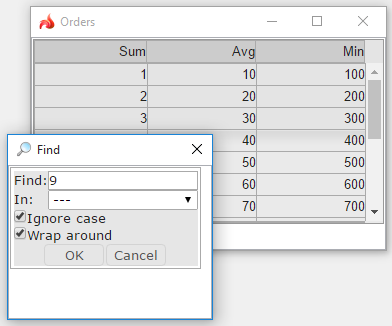
When the user enters the value and presses OK, the dialog starts searching for a row in which a field value would match the entered one:
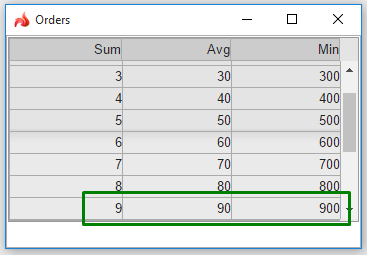
After the first value is found, the user can press the default acceleration keys (e.g., CTRL+G) to trigger the findnext action and to find the next matching in the list. The findnext action does not open the search dialog window, but resumes the search using the previously entered value.
The search value is compared with the string displayed to the fields, i.e. is based on the value format. For example, MONEY fields will have the currency symbol and the user should enter the search value including this symbol and using correct separators.
By default, the search is performed in all the columns, but the find dialog box offers the user to choose a specific column for search:
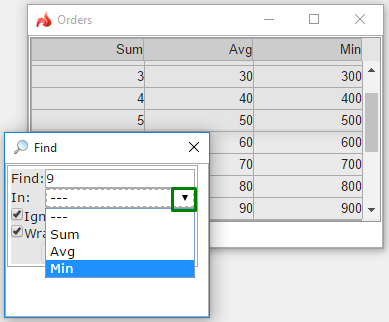
The search scans only the text widgets. Radio buttons, checkboxes, images, as well as TEXT and BYTE fields are not processed during the search.
 find searches among the values stored in the memory, so the search is disabled when the application performs the display in the paged mode - the code contains the ON FILL BUFFER clause.
In dynamic tree views, built-in find searches among the nodes stored in the program array.
You can specify your own actions for the find and findnext actions using the ON ACTION clause. In this case, the default built-in find action is disabled.
