7. Configure the Runtime
7A. Add Variables to the inet.env File
Purpose: inet.env is a Lycia configuration file that contains environment variables used at runtime when running applications using LVSCE.
Creation: QPM does not create inet.env by default. You might need to create a custom inet.env if you want to customize the runtime environment (e.g., for debugging, compatibility mode).
Common Environment Variables set in inet.env:
- Paths: PATH, LISTENERXML, LYCIA_USER_ACTION_DEFAULTS, LYCIA_USER_THEME_CSS, FGLIMAGEPATH, FGLLDPATH, DBPATH, CLASSPATH, LD_LIBRARY_PATH, FGLSOURCEPATH.
- Debugging: QXDEBUG (logs debugging results: object cache info, errors, SQL issues, client-server messages), LYCIA_SEVERITY (logging level: error, warn, info, trace), LYCIA_POST_MORTEM_LENGTH (how many last log messages on crash).
- Compatibility: QX_COMPAT (e.g., Informix4GL, Lycia, GBDS).
- Date/Numeric/Money Formats: DBDATE, DBFORMAT, DBMONEY.
- MDI Mode: QX_MDI=1 (switches the MDI on), QX_MENU_WINDOW=1 (adds "Window" menu), QX_MENU_WINDOW_NEW_CHILD=1 (adds "New application" to Window menu).
- Variable Initialization: QX_INITVAR=1 (initializes all variables to non-NULL).
- String Splitting for Compatibility: QXBREAKCH_START, QXBREAKCH_END, QXREP_SPACES (must be set with QX_COMPAT=Informix4GL).
- UI Locale: QX_UI_LOCALE (overrides browser language preferences for translations).
Structure: inet.env does not have a specific structure. Environment variables are applied one-by-one in the order they are defined. If a variable is defined multiple times, the lastly defined value is applied. If a variable relies on another (v1 uses v2), v2 must be defined before v1.
inet.env and AppServer Instances: Every inet.env file is created for a specific application server instance, and its location must be defined in listener.xml using the <envfile> tag. The default location for inet.env is /opt/Querix/Lycia/etc/inet.env.
7B. Edit the VS Code Settings for Runtime (LVSCE)
Settings Files: LVSCE runtime behavior is influenced by the settings.json files (user, workspace, folder settings) and <workspace_name>.code-workspace.json for the workspace.
Accessing Settings: In VS Code, go to File → Preferences → Settings, or press CTRL + SHIFT + P and select Preferences: Open User Settings. Filter settings by typing Lycia in the search bar.
The Key LVSCE Runtime Settings:
- "lycia.absolutePathToLyciaInstallation": Path to your Lycia installation (fill this in if you set a non-default location at Lycia installation).
- "lycia.debug: DefaultWebserver": Default web server name for debug configurations (e.g., 198.168.0.25:9090 for remote debugging; if not set, localhost will be used).
- "lycia.debug: DefaultServerInstance": Default AppServer instance (e.g., default or secure).
- Optional: "lycia.debug: DefaultLaunchArgs": Arguments for the qrun tool (for example, -d informix).
- Optional: "lycia.debug: DefaultLaunchClientParams": URL parameters for Lycia client (for example, console=page for output to console, unl=1 (enables the debug cache), cache=check).
- Optional: "lycia.debug: DefaultLaunchEnvironment": Additional environment variables for run/debug sessions.
- Optional: "lycia.debug: Build And Deploy Before Launch": Defines whether to build and deploy before launching the debug.
- Optional: QX_ROOT_OBJECT_CACHE_PATH: Custom path for the application cache. Note: This variable must be set both in settings.json for deployment and inet.env for runtime.
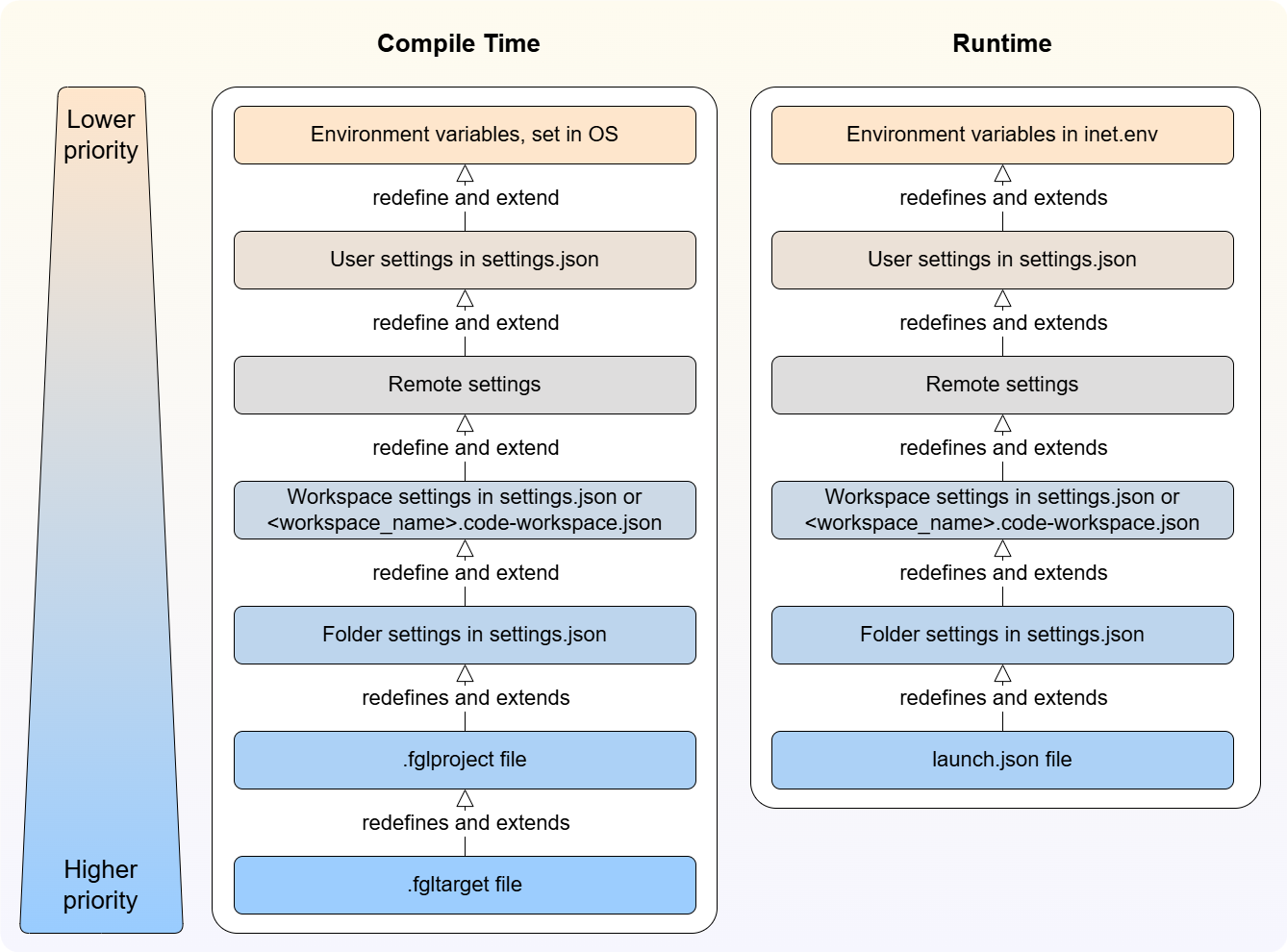
Settings Precedence: LVSCE settings are applied in this order:
- For compile time: OS environment variables < User settings in settings.json < Remote settings in settings.json < <workspace_name>.code-workspace.json < Folder settings in settings.json < .fglproject file < .fgltarget file;
- For runtime: environment variables set in inet.env < User settings in settings.json < Remote settings in settings.json < <workspace_name>.code-workspace.json < Folder settings in settings.json < launch.json;
-
For applications launched directly in a browser, environment variables (inet.env), parameters passed from the server, and launch arguments set in the URL are controlling factors.
Program-level Runtime Configuration: For individual programs, the runtime environment can be configured using fgl_setenv() and fgl_putenv() functions within the 4GL code itself.
See next: 8. Configure Jetty (Lycia Web Server)