Forms
Form Files and Formats
A form file is a file used for input and interaction with a 4GL program.
.fm2 is a modern and advanced form file format that extends the opportunities of legacy .per form and modernizes its look. Also, .fm2 format is easy to operate with, as it basically contains an XML code.
Using Lycia VS Code Extension, you can start your work with .per or .4fm form files, as we have tools to convert them into .fm2 format. Read more about form conversion here: Converting Form Files.
Form Object
The Form Object is the abstract container where all the contents of the form are stored:
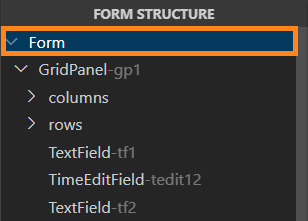
It has its own properties, which you can see in the Properties view after you click the Form Object:
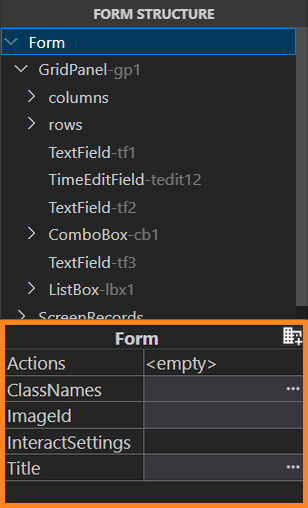
The Form Object’s XML code:
<form xmlns="http://namespaces.querix.com/2015/fglForms">
...
</form>
Root Container
A new form is created without any container inside:

When you drag-and-drop the first container from the Palette to the Design Area and place it within the Form Object, the Form Object’s window, displayed in the Design Area, expands:

That first container will become a Root Container - the seat for all other containers and widgets of the form.
The XML code of a GridPanel as a Root Container will be the following:
<form.rootContainer>
<GridPanel visible="true" preferredSize="," identifier="gp1">
</GridPanel>
</form.rootContainer>
Containers and Widgets
A container is a form element, within which you can place other elements (containers and widgets).
A widget is a form element to serve as a field for the display and input of data.
To learn what containers and widgets to pick for specific tasks, proceed to the following chapters:
Layout Rules
There are certain rules of size and alignment of form properties. Follow them to ensure the form will look exactly as you need it to:
- If any element (Root container, container, or widget) has horizontal / vertical alignment other than STRETCH, you must either explicitly set its size or explicitly set the size of at least one its descendant.
- If you use a StackPanel, all its descendants must have explicitly defined width or height - depending on the stack direction (height for vertical, and width for horizontal).
Exceptions:
- A Root containers with horizontal / vertical alignments set to STRETCH will ignore any size properties when the program is in the fullscreen mode.
- A Root container with horizontal / vertical alignments set to STRETCH must have some size specified when opened in a bordered window. If no size is set, this Root container will get the default size of 600x400 px.
- Root containers ignore the preferredSize of its child elements if the horizontal / vertical alignment of this child element is set to STRETCH.
- Forms that have a CoordPanel as a Root container can’t use the STRETCH alignment.
- In a GridPanel, if the column width or row height is set to 100%, this column / row occupy all the available space. If several columns or rows have 100% width / height, the free space will be equally divided between them.
Customizing the Form’s Look
The Form Builder is a tool for modifying the form’s layout. You can add more details to your form’s look with themes, CSS styles, images, scripts, etc. For more detail, refer to the following pages:
- Qxthemes and CSS Themes Usage and Precedence
- UserTheme.qxtheme
- UserTheme.css
- Master and Application .qxtheme
- Master and Application CSS theme
- Customizing Your Form Using Public Resources
Displaying the Form
To get the form displayed at runtime, use the OPEN WINDOW ... WITH FORM statement. See the code example below:
OPEN WINDOW my_form AT 1,1 WITH FORM "form_file"
ATTRIBUTE (BORDER)
Here,
my_form stands for the variable of the WINDOW data type, defined in the MAIN block;
form_file is the name of the form file to be displayed in a newly opened window.