Using Lycia Tools to Build and Compile
Building Programs
Lycia allows building 4GL programs and compiling single source files directly from context menus of FGL Project Explorer in Lycia VS Code Extension:
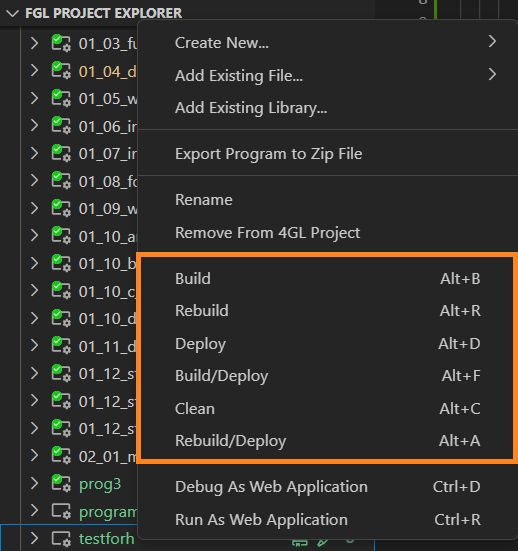
Build
Building means compiling and linking 4GL source files, converting .per forms into .fm2, and processing other sources. If any 4GL source file was not changed since the previous compilation, it will be skipped.
Clean
Clean is used to clean the building results from the output folder of the current program.
Rebuild
Rebuilding means that all the files included in the program will be compiled and built regardless of whether they were recently changed. Thus, the Rebuild action triggers sequential operations of cleaning and building. Rebuild is reasonable only in certain cases - for example, when the compiler versions get out of synchronization because it may cause unexpected problems at runtime.
Compile
Compile is used to compile the currently edited file. The Compile action can be activated from the context menu of a single file in Lycia VS Code Extension.
Usually, 4GL developers choose to compile a single file when they need to quickly check it for errors (with the other source files still being edited).
Building Programs With Command Line Tools
With Lycia, 4GL programs can be built and compiled from the command line. The table below contains the command line tools, which can be used for compilation. Click the name of the tool to get more information.
| qbuild |
compiles projects or their elements created in LVSCE and located in the workspace |
| qfgl |
compiles 4GL source files into a intermediate representation (IR) modules |
| qlink |
links IR modules together |
| qform |
compiles legacy form files |
| qrun |
can be used to build native code (qrun --aot) |