maxLength
maxLength specifies maximum length in bytes for strings input to a field.
Inside the following text widgets: TextField, TextArea, FunctionField can be enabled maxlength tracker that shows number of the characters left inside the widget field. To enable the maxlength tracker, specify the maximum length for strings inside the maxLength field:

maxLength tracker applied for the FunctionField
.png)
maxLength tracker applied for the TextArea
.png)
maxLength tracker applied for TextField. (Example shows TextField field with hidden symbols):
.png)
Form XML code:
Possible values:
any integer (limited by the data type (and size) of a variable assigned to the field)
Default value:
depends of the data type (and size) of a variable assigned to the field
Associated containers, widgets and theme elements:
Associated 4gl syntax:
Associated ui methods:
SetMaxLength ↓
GetMaxLength ↓
Influence and behavior:
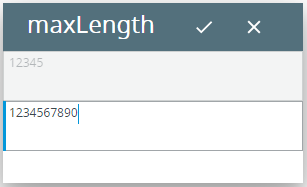
The value set to the property specifies the maximum length (in bytes) you will be able to input into the field:
For the first textArea (identifier=f1), maxLength=5.
For the second textArea (identifier=f2), maxLength=10.
4gl code sample:
MAIN
DEFINE f1,
f2 STRING
OPEN WINDOW w
WITH FORM "maxLength"
ATTRIBUTE(BORDER)
MENU
COMMAND "input"
INPUT BY NAME f1 WITHOUT DEFAULTS
INPUT BY NAME f2 WITHOUT DEFAULTS
COMMAND "exit"
EXIT MENU
END MENU
END MAIN
intended input:
1234567890
runtime appearance:
When set together with autonext, the property can be used in order to increase the interface user-friendliness.
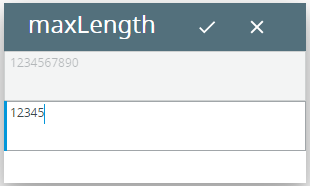
At runtime, you can use ui methods to find out the maximum length of the data string which can be input to the field and change it:
LET widget_var= ui.<widget>.ForName("widget_id1")
CALL widget_var.setMaxLength(<int>)
4gl code sample:
DEFINE ta_1
ui.TextArea
...
LET ta_1
= ui.TextArea.ForName("f1")
CALL ta_1.setMaxLength(10)
DEFINE
ta_2 ui.TextArea
...
LET ta_2
= ui.TextArea.ForName("f2")
CALL ta_2.setMaxLength(5)
initial runtime appearance:
runtime appearance after ui methods were applied:
LET widget_var = ui.<widget>.ForName("widget_id1")
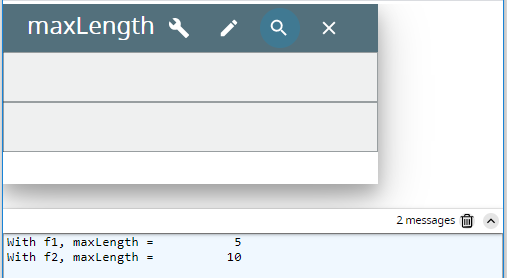
DISPLAY widget_var.getMaxLength()
4gl code sample:
MAIN
DEFINE f1,
f2 STRING,
ta_1, ta_2
ui.TextArea
OPEN WINDOW w
WITH FORM "maxLength"
ATTRIBUTE(BORDER)
LET ta_1
= ui.TextArea.ForName("f1")
LET ta_2
= ui.TextArea.ForName("f2")
MENU
COMMAND "display"
DISPLAY "With
f1, maxLength=", ta_1.getMaxLength()
DISPLAY "With
f2, maxLength=", ta_2.getMaxLength()
COMMAND "change"
CALL ta_1.setMaxLength(10)
CALL ta_2.setMaxLength(5)
COMMAND "exit"
EXIT MENU
END MENU
END MAIN
runtime appearance:
 Related articles