Types of Windows in Lycia: Bordered, Flat, Dialog, Full-Screen
In this documentation, we refer to four types of windows that can be opened by 4GL applications developed with Lycia - flat, bordered, dialog, and full-screen.
Bordered window is a window that can have and has a MenuBar, Toolbar, and Status Bar. Can be both parent and child.
Flat window is a child window which can have a MenuBar, toolbar, and status bar but its MenuBar, Toolbar, or Status Bar is displayed to its parent.
Dialog window is a bordered window that can be moved within your application.
Full-screen window is a flat or bordered window opened in a full-screen mode. Full-screen windows occupy the whole screen of a computer and covers up everything in the background.
Bordered Windows
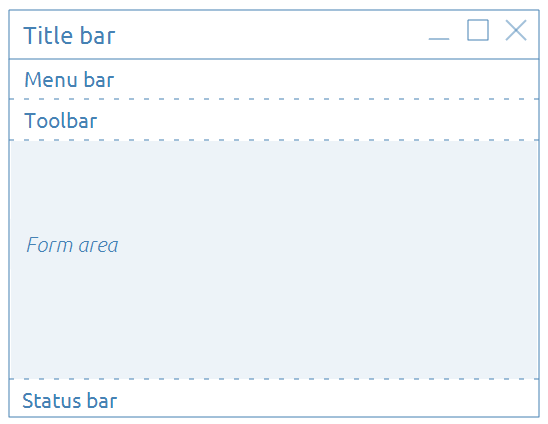
Bordered window is a window that can have and has a MenuBar, Toolbar, and Status Bar.
Here is a basic diagram of a bordered window:
In a very simple form this diagram looks like this:
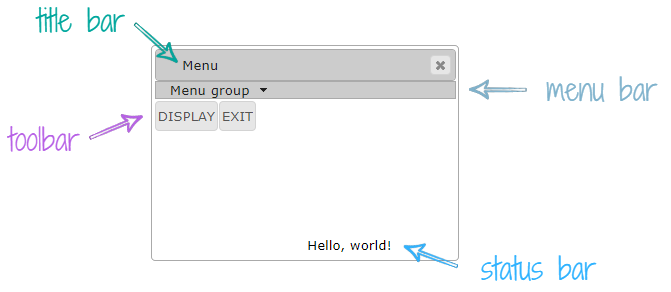
On the client-side, bordered windows are converted into the class, qx-dialog, with its children and descendants.
Form area is a part of the dialog window where your .fm2 forms are displayed.
On the client-side, the content of this form area is converted into classes, qx-pane and qx-content.
By default, the size of the form area is 600x400 px - the default size of a root container in a .fm2 form. Otherwise, form area has the size specified for the root container.
 Related articles:
Full-Screen Windows
Full-screen windows occupy the whole screen of a PC, laptop, tablet, or smartphone, and covers up everything in the background.
You can open any window in full-screen mode - regardless of whether it is flat, bordered, or dialog.
On the client-side, full-screen windows are converted into the class, qx-window-border, with its children and descendants.
When you open a window full-screen, it occupies all the available space and completely ignores the preferred size of the root container.
This available space is determined by the size of the browser window.
When you add widgets and containers to your .fm2 forms, the size of these widgets and container when opened full screen depends on the specified horizontal/vertical alignment:
- if horizontal/vertical alignment is set to Stretch, this container or widget will occupy all the available space (= space left by other containers/widgets);
- if horizontal/vertical alignment is set to Left/Center/Right or Top/Center/Bottom correspondingly, this container or widget will have the size specified by preferredSize;
- if horizontal/vertical alignment is set to Default, the size of this container or widget will depend on what horizontal/vertical alignment is the default one. For example, for buttons, the default alignment is Left Top, for canvases - Stretch Stretch, and for calendars - Stretch Top.
Compare a simple form opened in a bordered window full-screen (the 1st image) and non-full-screen (the 2nd image):


You can learn how to open bordered windows in the full-screen mode from the following pages: Full-Screen Windows With LyciaDesktop and Full-Screen Windows With LyciaWeb.