preferredSize
preferredSize sets the size the form element must have at runtime.
preferredSize is one of the main properties for all containers and widgets.
 in Lycia Form Builder

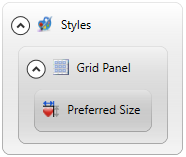
Form XML code:
Theme property filter XML code:
<DoStyleAction>
<SetProperty>
<PropertyPath>
<PropertyName>PreferredSize</PropertyName>
</PropertyPath>
<PropertyValue type="Size" Width="200px" Height="100px" />
</SetProperty>
</DoStyleAction>
Possible values:
integer number of any css units
Associated containers, widgets and theme elements:
Associated ui methods:
setPreferredSize()
getPreferredSize()
Influence and behavior:
preferredSize is used to set the size of the form element - container or widget - exactly.
If the preferredSize is set, this form elements will have this size even if its parent or ascendant element is resized.
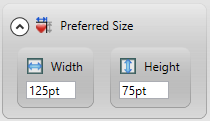
preferredSize is a compound property: It consists of two sub-properties - Width and Height both in Lycia Form Builder and LTD:


You set either both width and height (recommended) or one of them.
If you set only width or only height, the second dimension is calculated based on the default dimensions for form elements, Lycia system theme and system css, or browser settings and requirements.
preferredSize can be set in all css units like px, pt, em, qch, etc.:

If you set preferredSize but do not specify its units, the size will be in pixels.
You can set the size of a form element at runtime via the corresponding ui method - SetPreferredSize():
CALL grd.SetPreferredSize(["250px", "250px"])
The getter - getPreferredSize() - returns the size set for the element in the .fm2 form, .qxtheme theme, or by setPreferredSize().
SetPreferredSize() takes two parameters - for width and for height - that can be specified as an array or as a record (see the example program, preferredsize_ui):
CALL grd.setPreferredSize(["250px", "150px"])
or
DEFINE root_size ui.Size
...
LET root_size.width="500px"
LET root_size.height="400px"
CALL grd.setPreferredSize(root_size)